How Slack's Notification Flowchart Decides What to Send
 Courtney ChuangFebruary 02, 2021
How Slack designs notifications to manage user attention
Slack decides whether to notify you by running each message through a flowchart: Is the channel muted? Are you in Do Not Disturb, and did the sender override it? What do your preferences say for this device? By default it notifies your desktop first and sends mobile push only after you go inactive there. Getting that balance right is central to Slack's mission of making work more productive. When notifications create too much noise, a once-essential collaboration hub can quickly become a distraction. But if they fall short, Slack risks becoming another app left idle in the background.
In September 2019, Slack exceeded 12 million daily active users. Few people have thought harder about capturing, and keeping, that attention than Liza Gurtin. As the former product lead for Slack's notifications team, Liza's charter was straightforward, if far from simple: empower users to sort the signal from the noise.
We sat down with Liza to talk about how her team handled the logic of delivering notifications, why the default state matters most, how to give users control, and why you shouldn't trade the user experience for short-term growth.
How Slack's flowchart powers smarter notification delivery
Delivering a notification is a bit like a game of "choose your own adventure." A single message can reach you in any number of ways, or not reach you at all, depending on your settings, your preferences, and where you happen to be active.
At Slack, answering the question “Should we send a notification?” requires navigating an intricate maze of decisions, ones made by both the business and the user. In 2017, Slack's engineering team published the now-infamous flowchart that maps it out.
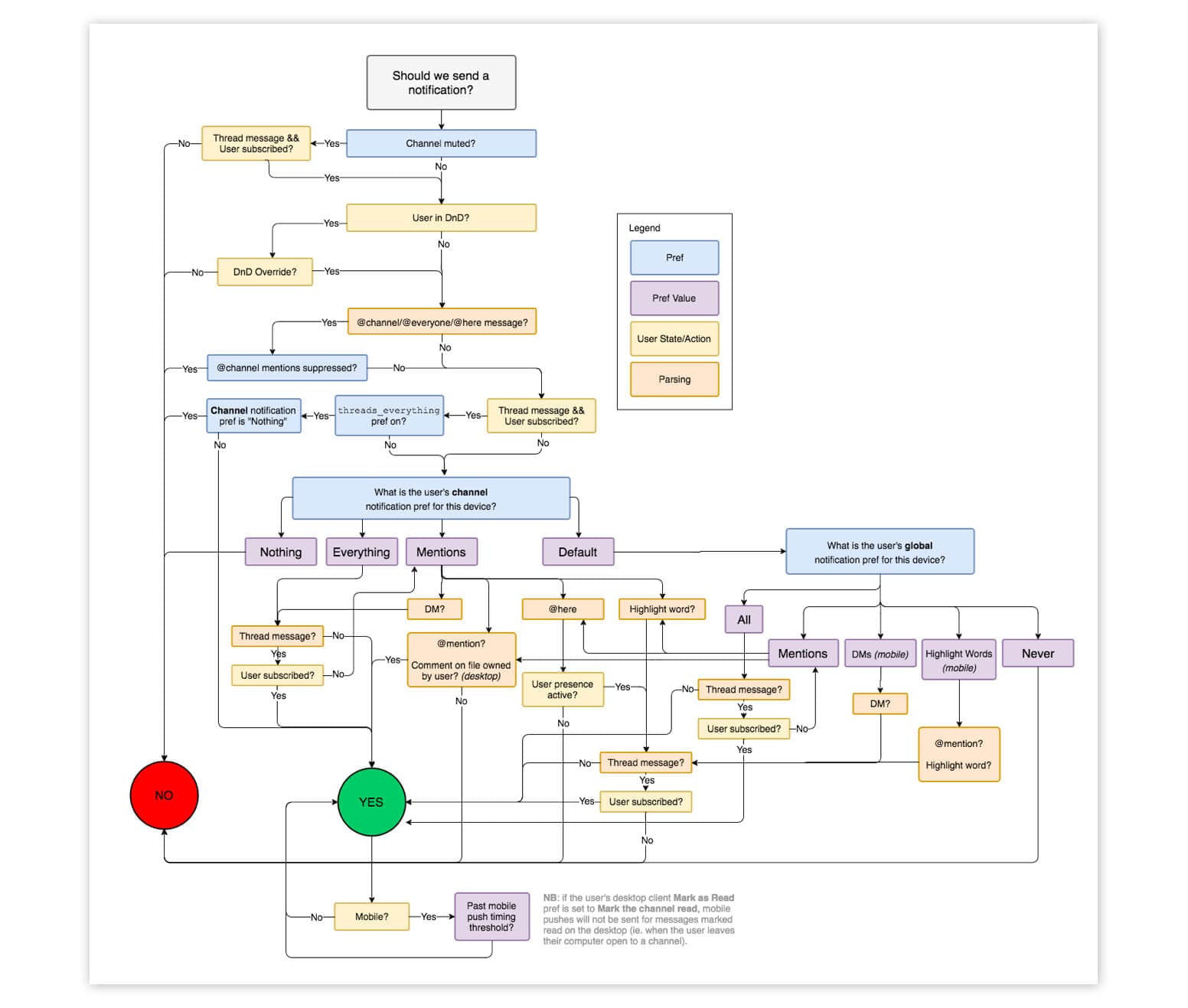
The driving force behind this flowchart is a clear-cut objective: to deliver the notifications users expect, when and where they expect it. “This work was foundational,” Liza explains. “It was about making notifications work in the way that users already expected. That came down to two things: ensuring users weren't overwhelmed by notifications and that they didn't miss key notifications.”
Slack's flowchart reflects the delicate balance the team struck between not overwhelming users and keeping them informed. For Slack's Do Not Disturb feature, for example, the team decided to give senders the ability to override the setting. “Because we're a workplace app,” Liza says, “we believe it's important that people are able to notify their teammates of mission-critical messages, even when their teammates have temporarily paused notifications.”
Each fork in the flowchart is a decision about what deserves a user's attention. Taken together, they decide the exact moments Slack pulls you back into the app.
Why Slack built a dedicated notifications team
Notifications have always been core to Slack. A messaging app is only as valuable as the conversations it enables, and notifications are how Slack pulls you into them.
But it wasn't until five years after the app launched that a team dedicated to notifications was formed. When Liza took charge of notifications in late 2018, she brought together a team of 10 full-time engineers along with part-time support from design, analytics, and user research.
One of the driving forces behind the new team? A slew of support tickets from frustrated users. “When the team first got started, notifications were actually one of the biggest drivers of support tickets,” Liza explains, “and one of the bigger problem areas in the product. In a lot of cases, notifications were working exactly as expected, but they weren't meeting user expectations. Users would complain about missing notifications or being overwhelmed by too many of them.”

Those tickets shaped the team's charter and their commitment to delivering what Liza saw as the core value of notifications. “Notifications are the primary way that products communicate with their customers, both in and outside the app,” Liza says, “and they're deeply entangled with how products manage their users' attention. As the notifications team, that was our charter: to enable Slack users to sort the signal from the noise.”
Once formalized, the team's charter led them to prioritize where most problems with notifications start: the default state. That is, before any customization, what notifications should Slack send?
Why smart defaults are crucial for notification UX
Few products obsess over the out-of-the-box experience for their notifications. Liza argues the default state is the most important one to get right, because it's how you build trust with your average user.
Liza puts it this way: “When users feel they need their attention drawn into Slack, they should trust Slack will notify them and pull them in. Equally, they need to trust that Slack's not going to bother them when it's something unimportant. That should be the default.”
Your average user won't spend hours customizing your product, and notifications are no exception. “Most users expect your notifications to work exactly the way they want,” Liza explains, “without having to do anything themselves. Less than 5% of Slack's users customize their notification settings.”
That puts it on you to set smart defaults. For Slack, that meant managing attention across every place people use it: the browser, the desktop client, and the mobile app. “To minimize disruption and noise, we made two big decisions early on,” Liza says. “The first was to turn email off after a user downloads the mobile app. The second was to prioritize sending notifications to the user's desktop client. By default, we only send push notifications to their phone if a user goes inactive on desktop.”

For most of Slack's users, those defaults are enough. The flip side, which Liza argues is equally important, is handing control back to the users who want it.
How Slack gives users control with notification preferences
Notification preferences allow users to turn up, or down, the volume on things that your product wants to tell them. Liza compares it to talking to a person: “Notifications preferences are a way for a user to say, ‘Hey, I don't want to hear about this. Or, I only want to hear about these two topics.’”
A user will always know more about their own preferences than you do. “In the context of Slack, the user knows their work day and the conversations that are important to them way better than our product team or even an AI model could predict,” Liza says. “Notifications are one area where more settings really are better.”
But a settings page isn't enough on its own. For the users who'll never go looking, Liza doubled down on what she calls “control in context.”
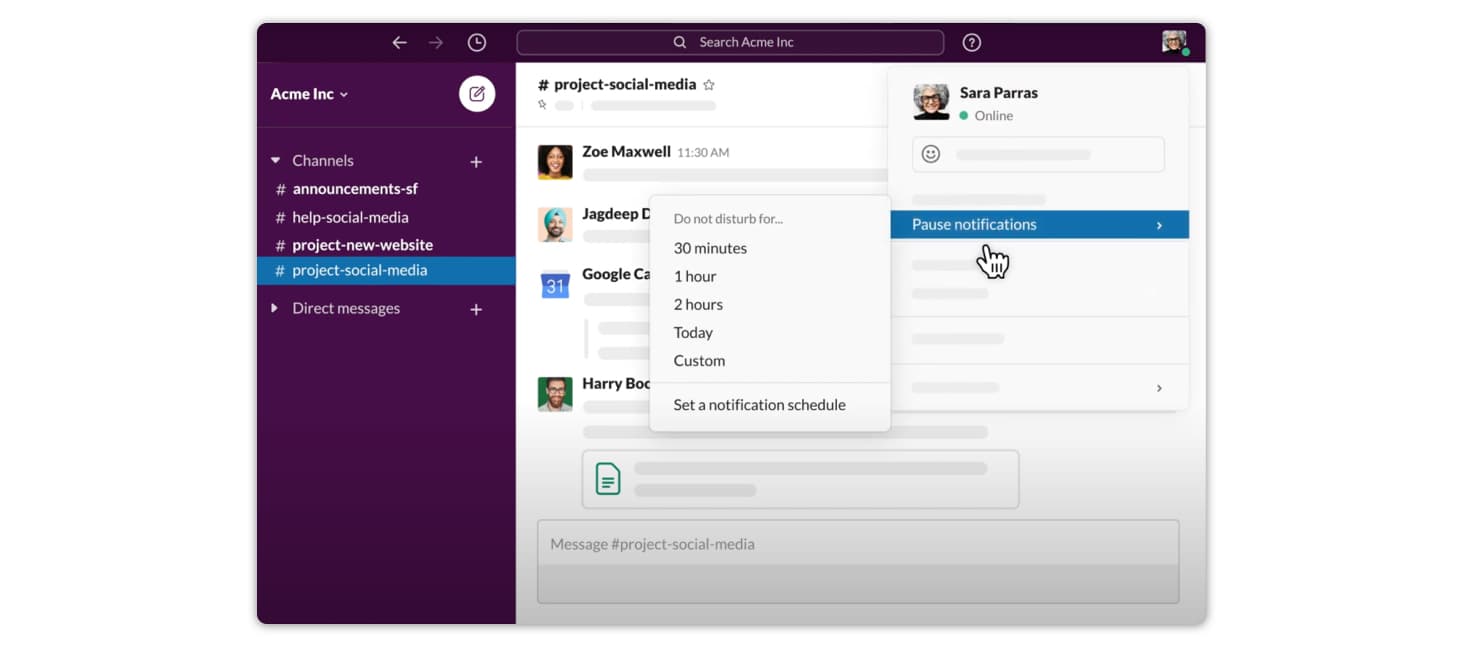
“Control in context,” Liza explains, “is about presenting users with an opportunity to adjust their notification settings at the exact moment those settings are relevant.” She gives the example of Slack's Do Not Disturb feature, which allows users to control the hours they receive notifications. “The first time a user gets a notification over the weekend, we should ask them whether they want to continue receiving notifications at this time in the future or change their settings. We know users are far more likely to take action when the feature is relevant than find the Do Not Disturb setting on their own.”
Design for long-term engagement, not growth hacks
There's a common misconception that notifications are an easy way to drive growth. Liza disagrees.
Liza warns against the seductive rush of sending a lot of notifications and seeing engagement rates spike. “More usage is not always better usage,” Liza cautions. “You might see a big early benefit from sending a lot of notifications. But there's a real downside: if you overwhelm users and they unsubscribe at the system level, at that point, you won't be able to resurrect them at all.”
Notifications give your product a lot of power over people's attention, so use them with care. One useful lens is the physical world. “Some notifications are like a gentle tap on the shoulder,” Liza says. “Some are asynchronous like getting a letter in the mail. Others are disruptive like screaming someone's name over and over again. You can guess which ones will cause users to leave.”

Notifications aren't a growth hack, but they can drive sustained engagement with your app when they deliver real value. Liza shares an example of a feature she considered launching at Slack: “One of the new notification types we thought about adding was alerting people if there's a lot of activity in a channel they haven't joined yet. Yes, this could be a growth tactic if someone isn't actively using Slack. But, really, we believed that being part of these high-activity channels would deliver value to the user.”
Liza's challenge to other product builders: “How can you balance what's good for your product and what's truly net positive for your users? If you want your notifications to be a driver of retention, to really pull people back into your product, then you need to put the user experience first. Don't be the person screaming in the office.”
How to design a Slack-style notification system
You don't need Slack's engineering team to put these ideas to work. Build three layers: smart defaults that fit the users who never open settings (Liza says fewer than 5% of Slack's users customize theirs), preferences with “control in context,” and routing that combines both with what the user is doing right now. Slack's version of that last rule: notify on desktop first, and send push only if you've gone inactive there.
For a deeper look at the architecture behind this, see our guide on how to design a scalable notification system and our field guide to reducing notification fatigue. For inspiration, browse 20 notification examples that actually drive engagement.
Building all three layers in-house is a real project. With Courier, Journeys let you build branching logic like Slack's flowchart in a visual builder, routing lets you set channel order and fallbacks across email, push, SMS, in-app, and Slack, and a preference center lets users choose which notifications they get and on which channels.
Frequently asked questions
How does Slack decide whether to send a notification?
Slack's flowchart starts with one question, "Should we send a notification?", and works through checks such as whether the channel is muted (unless it's a thread you follow), whether you're in Do Not Disturb (and whether the sender overrode it), whether @channel and @here mentions are suppressed, and what your channel and global notification preferences say for that device. A final check holds mobile push until a timing threshold passes. Liza Gurtin says the goal was to deliver the notifications users expect: not overwhelming them, and not letting them miss key ones.
How does Slack manage notifications across different channels?
Liza Gurtin says Slack made two early decisions to cut noise: prioritize sending notifications to the user's desktop client, and turn email off after a user downloads the mobile app. By default, Slack sends a push notification to your phone only if you go inactive on desktop.
What is a notification flowchart and why does Slack use one?
A notification flowchart is a decision tree that maps whether, when, and where to send a notification. Each fork checks one condition, such as a muted channel, Do Not Disturb, or your preferences, which turns notification logic into a repeatable rule set instead of ad-hoc code. Slack's engineering team published theirs in 2017, in a post about reducing the desktop app's memory footprint.
Can I send Slack notifications with Courier?
Yes. You connect a Slack app to Courier with a bot token, design a Slack template, and send to a user (by email or ID) or a channel through the Courier API. Follow Courier's Slack integration guide for the setup.
Similar resources
Catch broken lifecycle journeys with synthetic users and AI
Paste one prompt into a coding agent and get a local test of your onboarding journey: synthetic users, real timing, and every send explained. Catch stale reminders before your customers do.

Control how fast Courier sends to your providers
You shouldn't have to think about how fast you send to Courier. Set a send rate limit on any provider, and Courier sends your notifications to it at the rate you choose. Anything over the limit is queued, not dropped.
Know the moment users change notification preferences
Every preference change in Courier now reaches your systems two ways. A `preferences:user:updated` webhook fires the moment a user opts in, opts out, or changes a topic's channels, wherever they made the change. `GET /preferences/logs` returns the history, newest first, with the previous value where Courier knows it. Keep your CRM, warehouse, or marketing tools in step with what users chose.